Smart Restock Alerts
What to reorder, how much, and by when — from your own sales history
Statistics, not AI — and completely free
Smart Restock Alerts analyzes your sales history and seasonal patterns to recommend what to reorder, how much, and by when. Unlike the features elsewhere in this section, it involves no AI provider at all: the math runs entirely inside Ardent Seller, nothing is sent anywhere, there is no consent toggle to worry about, and it is free and unmetered on every plan. And because it is plain statistics, every recommendation can show you exactly why it was made.
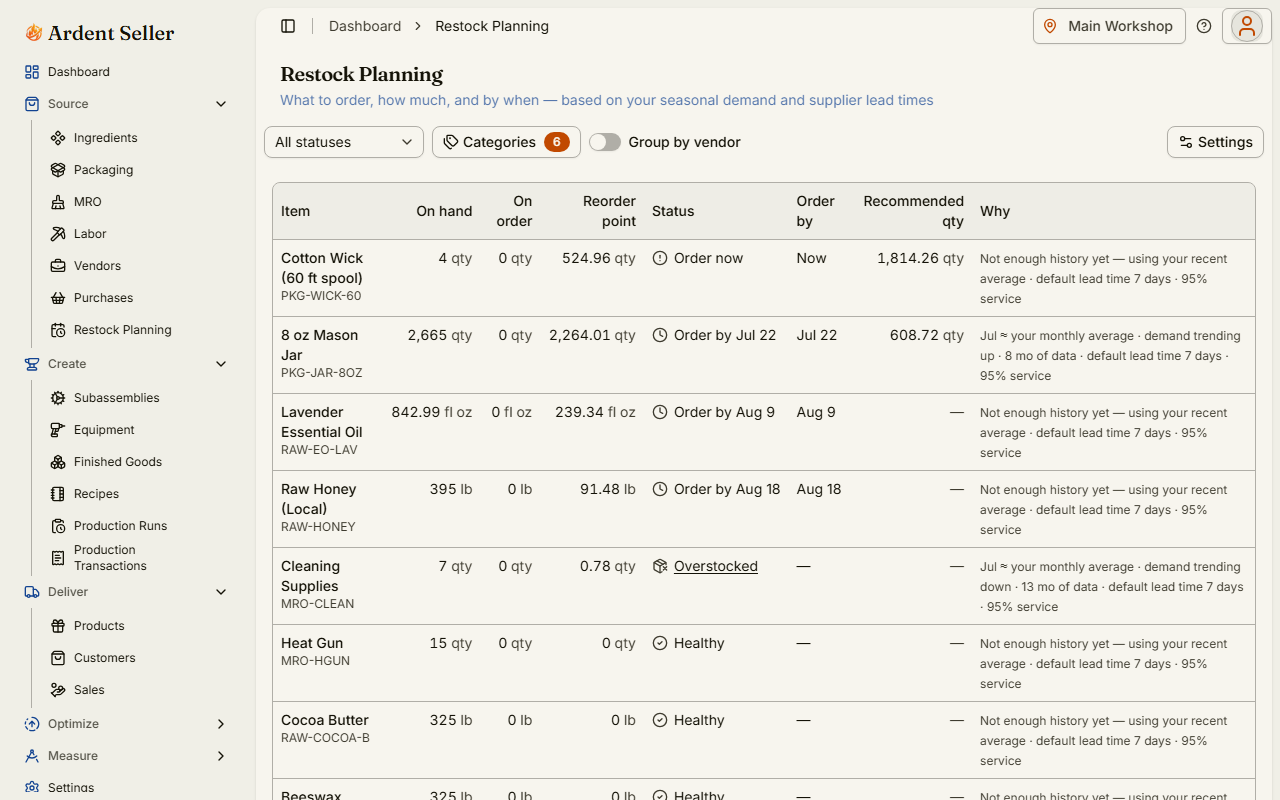
Where to find it
- The full planner — Source → Restock Planning. This sidebar entry belongs to the Advanced inventory ops module, so if you don't see it, enable that module first (see Setup & Modules).
- The dashboard widget — a Smart Restock widget is on your dashboard by default, showing the items that need attention soonest.
- The weekly email digest — a restock-plan summary arrives weekly. It's on by default; turn it off with the "Restock alerts" toggle in your email preferences.
How recommendations are calculated
For each stocked item at each location, Ardent Seller builds a picture of demand from your completed sales, month by month, across the trailing twelve-plus months (months with no sales count as zero — that's real information). From that history it derives:
- A base demand rate — your typical monthly sales for the item.
- A seasonal index — how each calendar month runs above or below your average (November for a gift-heavy shop, for example).
- A growth trend — whether the item is trending up or down over time.
It then combines expected demand with the vendor's lead time and a safety-stock buffer (sized by your chosen service level and how variable the item's sales are) to compute a dynamic reorder point — the stock level at which you should order. If you've set a manual replenish point on the item, the dynamic point never drops below it: your floor always wins.
The four statuses
| Status | What it means |
|---|---|
| Order now | On-hand plus on-order stock is at or below the dynamic reorder point — waiting longer risks a stockout during the vendor's lead time. |
| Order by [date] | You have some runway. The date is the last day you can order and still receive stock before it runs low. |
| Healthy | Stock comfortably covers expected demand — nothing to do. |
| Overstocked | Stock exceeds your maximum-coverage cap — you're carrying more than your sales pace justifies. |
How much to order
The recommended quantity is what you'd need to reach your target coverage (a number of weeks of expected demand you choose in settings), minus what you already have on hand and what's already on order in open purchases — so it never tells you to reorder something that's on the truck.
When vendor data exists, the raw number is made orderable: raised to the vendor's minimum order quantity, rounded up to the vendor's order increment (packs of 6, cases of 12), and capped so the order won't push you past your overstock ceiling.
Every row explains itself
Each recommendation carries a plain-language "why" line, along the lines of: "Nov is about 3.2× your monthly average; 14 months of data; lead time 5 days; safety stock for 95% service." If a recommendation looks odd, the why line tells you which input to check — usually the vendor's lead time or a sales pattern that has genuinely changed.
Settings
| Setting | What it controls |
|---|---|
| Service level | How cautious the safety stock is: lean, balanced, or cautious. Higher service means fewer stockouts but more stock on the shelf. |
| Target coverage weeks | How many weeks of expected demand a recommended order should leave you holding. |
| Planning horizon | How far ahead the planner looks when projecting demand and order-by dates. |
| Fallback lead time | The lead time assumed for items whose vendor has none recorded. |
| Max-coverage cap | The overstock ceiling — recommendations never push you past this many weeks of stock, and exceeding it flags the item as Overstocked. |
| Category scope | Which inventory categories are included in restock planning. |
| Email frequency | How often the restock digest email arrives (or turn it off entirely). |
Limits
- Per item, per location — recommendations are computed for each location separately; it won't suggest transferring surplus stock from another location instead of buying.
- Young items get simpler math — with less than about three months of sales history there's no seasonal pattern to read, so the item falls back to a flat average with a "limited history" note.
- No vendor lead time? A configurable fallback lead time is used — set real lead times on your vendors for better order-by dates.
- It recommends; you order — Smart Restock never places orders or creates purchases. You record the purchase yourself when you buy.
Related articles
AI Features
An overview of the AI features in Ardent Seller — invoice and receipt import, Snap-a-Sale, the listing copywriter, and the pricing advisor — plus the consent toggles, plan allowances, credits, and exactly what data is (and is never) sent.
Setup & Modules
How the four-question setup interview tailors Ardent Seller to your business, what the six modules show and hide, and why turning a module off never touches your data.
Source Guide
Guide to sourcing in Ardent Seller — manage ingredients, packaging, vendors, and purchase orders.