Smart Pricing Advisor
See where your prices stand for free — and get AI recommendations when you want them
Two layers: a free health check, and AI advice on top
Pricing help in Ardent Seller comes in two layers. The Pricing Health report is free on every plan: a deterministic report that computes every sellable item's margin from your real costs and flags problems — no AI involved, and it works even with the AI toggle off. On top of it sits the AI advisor, a metered feature that turns those numbers into specific price recommendations you accept, edit, dismiss, or snooze. Nothing ever changes a price without your explicit say-so.
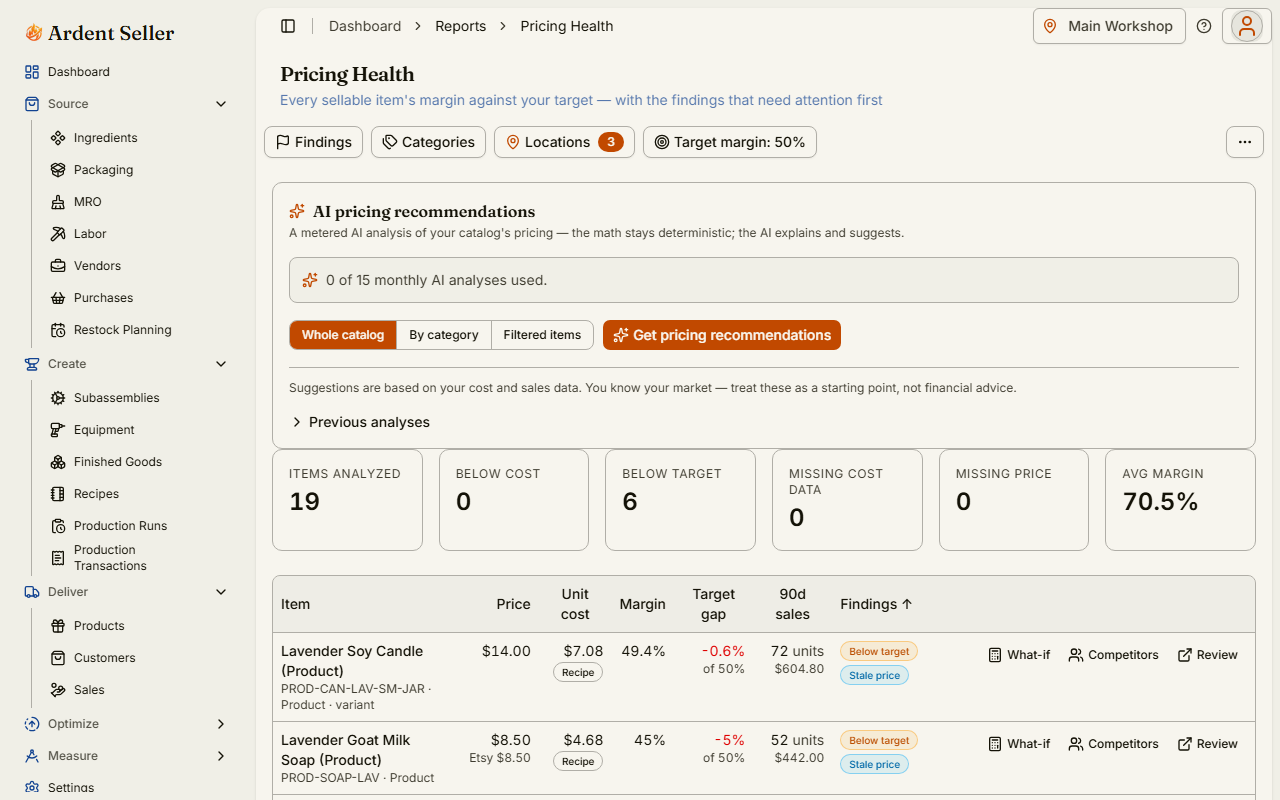
The free Pricing Health report
Open Reports → Pricing Health (there's a matching dashboard widget too). For every sellable item it shows:
- Margin against your target — the current margin computed from real cost and price, compared with the margin you're aiming for.
- Below-cost flags — items selling for less than they cost you to make or buy, surfaced first.
- Cost sources — each item's cost shows how it was computed, so you can trust (or fix) the number behind the margin.
- What-if pricing — try a different price and see the margin recompute before you commit to anything.
The report is unmetered and available on every plan, and it keeps working when the AI pricing advisor consent toggle is off.
Where your costs come from
Every margin is only as good as the cost behind it, so the report picks each item's cost from the most reliable source available, in this order:
| Priority | Cost source | What it means |
|---|---|---|
| 1 | Recipe cost | For items you make: the rolled-up cost of the recipe's ingredients and labor — the truest picture of what a unit costs you. |
| 2 | Latest landed cost | For items you buy: the most recent purchase line's cost including its share of shipping and tax — what the last batch actually cost, delivered. |
| 3 | Moving average | The running average cost across your purchase history — the fallback when there's no recipe and no recent landed cost. |
Items with no usable cost at all are flagged as missing cost data rather than shown with a misleading margin. For the full story on costing, read How Costing Works.
AI price recommendations
When you want advice, not just diagnosis, click "Get pricing recommendations" on the Pricing Health page (also reachable from the dashboard widget and the price-review workflow). A scope picker lets you analyze your whole catalog (up to 400 items per run), a single category, or hand-picked items — with the run's cost disclosed before it starts.
Results come back as severity-ordered cards — below-cost items first, then below-target margins, missing cost data, missing prices, stale prices, tier drift, and finally your margin leaders. Each card shows the current and suggested price, the expected margin, the channel it applies to (direct, Etsy, or all), and the reasoning. You respond per card:
- Accept — applies the suggested price to the item (audited).
- Edit — tweak the number first, then accept your version.
- Dismiss — reject it; the advisor remembers your dismissals.
- Snooze — not now; it can resurface later.
Two safety properties are worth knowing: all money math (margins, deltas) is recomputed by Ardent Seller, not taken from the model's arithmetic, and nothing reprices silently — a recommendation you never accept changes nothing. Channel-specific suggestions propose a pricing-tier change rather than touching your base price.
Competitor prices, digests, and schedules
- Manual competitor prices — record what comparable items sell for and the advisor weighs them in its reasoning; entries older than six months are flagged as stale.
- Weekly below-cost digest — an opt-in email that lists anything selling below cost, so a costing change never goes unnoticed for long.
- Scheduled monthly analysis — run the advisor automatically each month and review the cards when you're ready.
- Etsy price push — approved prices can be pushed to your linked Etsy listings, gated behind its own review step.
What it costs
The Pricing Health report is free, always. Each successful AI analysis run uses 1 unit of your monthly pricing-analysis allowance (1 on Free, 5 on Maker, 15 on Artisan, 40 on Workshop) or 2 credits on Pay As You Go. Failed runs cost nothing. See AI Features for the full allowance and credit model.
A starting point, not financial advice
The advisor reasons from your costs, margins, sales velocity, fees, and any competitor prices you've recorded — it does not project demand or promise that a higher price will sell. You know your market, your customers, and what your work is worth. Treat every card as a well-informed starting point for your own judgment, not financial advice.
Related articles
AI Features
An overview of the AI features in Ardent Seller — invoice and receipt import, Snap-a-Sale, the listing copywriter, and the pricing advisor — plus the consent toggles, plan allowances, credits, and exactly what data is (and is never) sent.
How Costing Works
How Ardent Seller calculates costs — weighted-average costing from purchases through recipes and production runs to the COGS and margin on each sale.
Smart Restock Alerts
How Ardent Seller's Restock Planning analyzes your sales history and seasonal patterns to recommend what to reorder, how much, and by when — free and unmetered on every plan.