
It's Sunday night, and you have eleven browser tabs open.
One is your Etsy dashboard. One is a spreadsheet you built in 2023 and have been a little afraid to touch ever since. One is your bank's website, because you're trying to remember whether that $80 charge was wax or shipping supplies. One is a label you're half-finished designing. Three are recipes you keep meaning to cost out. You are not running a business right now. You are being run by your tabs.
Every one-person handmade business eventually builds a stack: the pile of apps, spreadsheets, and sticky notes that keeps the operation upright. The problem is that almost nobody builds theirs on purpose. It accretes. You add a tool the week something breaks, you never remove one, and three years later you're paying for software that overlaps with the free thing your storefront already includes — while the one job that's actually costing you money sits uncovered.
Here's the reframe that helps. Your stack isn't a pile of apps — it's a set of six jobs that have to get done: make and cost, sell, ship, keep the books, get found, and run the back office. Cover all six and the length of your app list barely matters; leave one unstaffed and it quietly bleeds money. The easiest job to leave unstaffed — and the most expensive to skip — is the first one: knowing what each product actually costs to make. The rest of this post walks all six jobs through three composite stacks and shows how to close that gap. To make it concrete, here are three stacks — the same six-job skeleton, leaking in three different places.
Three makers, three stacks
Three composite makers — each one invented to stand in for a familiar one-person setup, not a real shop:
Nadia (composite), candlemaker, year one — the stack that fits in her head
Nadia sells nine scents on Etsy. Her entire stack is the Etsy app, one spreadsheet of supply costs she updates "when she remembers," Canva for labels, and the Notes app on her phone for everything else. It's lean and it's free, and for a while it works fine.
The hole is costing. Nadia can tell you her revenue to the dollar, but she can't tell you which of her nine scents actually makes money — the spreadsheet has supply prices, not finished-candle costs. So when she ran a 20%-off promo on her "best seller," she didn't know she was discounting her thinnest-margin scent. She sold a lot of candles that month and made almost nothing on them. The stack didn't lie to her, exactly. It just never knew the answer.
Jordan (composite), jewelry maker, year three — the stack that sprawls
Jordan sells on Etsy, on a Shopify site, to three wholesale accounts, and at two markets a month. The stack grew to match: Etsy, Shopify, a Square reader for markets, a label tool for shipping, a paper notebook for wholesale orders, and a January shoebox of receipts handed to a bookkeeper.
The hole is that inventory lives in four places and none of them agree. Jordan sold a sterling cuff at a Saturday market that had quietly sold on Etsy that morning, and spent the next week apologizing and remaking. Most months, "how many do I have" is genuinely unanswerable without a counting session. Jordan isn't under-tooled — there are six tools here. They just don't talk to each other, so Jordan is the integration.
Priya (composite), template and planner seller, year two — one spreadsheet doing five jobs
Priya sells digital planner templates plus a few print-on-demand printed editions. Her stack is mostly one heroic spreadsheet: a products tab, a versions tab, a sales log, a customer-email list, a COGS tab, and a refunds tab. Six tabs, one file, load-bearing.
The hole is fragility. A copy-paste error double-counted a month's sales, and it took her two evenings to find. A version mix-up once sent a buyer the wrong file. The spreadsheet works right up until it doesn't, and Priya is the only person on earth who knows how it's wired. She's not running five tools — she's running one tool pretending to be five, which is its own kind of risk.
The six jobs every one-person stack has to cover
Three different crafts, three different stacks — and the same underlying skeleton. Strip away the specific apps and every one-person handmade business is running these six jobs:
- Make and cost — what you build, what it's made of, what it truly costs: materials, recipes or a bill of materials, batches, finished-goods stock, and COGS.
- Sell — the storefront, marketplace, or point-of-sale where money actually comes in.
- Ship — buying postage, printing labels, handing customers a tracking number.
- Keep the books — income, expenses, sales tax set-aside, and the profit-and-loss your accountant needs in April.
- Be found and stay in touch — listing photos, graphics, email, social, and answering customer messages before they go cold.
- Run the back office — files, passwords, the calendar, and the boring glue that holds the rest together.
Now look back at the three stacks. Nadia, Jordan, and Priya have very different tools, but they all sprang a leak in the same place: job one. Nadia had no real costing. Jordan's make-and-cost data was scattered across four channels that didn't reconcile. Priya collapsed job one into the same fragile spreadsheet as everything else. Different symptoms, same missing staff member.
Rule of thumb: The first job — make and cost — is the easiest one to leave half-built. It stays invisible until a discount, an oversell, or a tax bill drags it into the light, and by then it's already cost you.
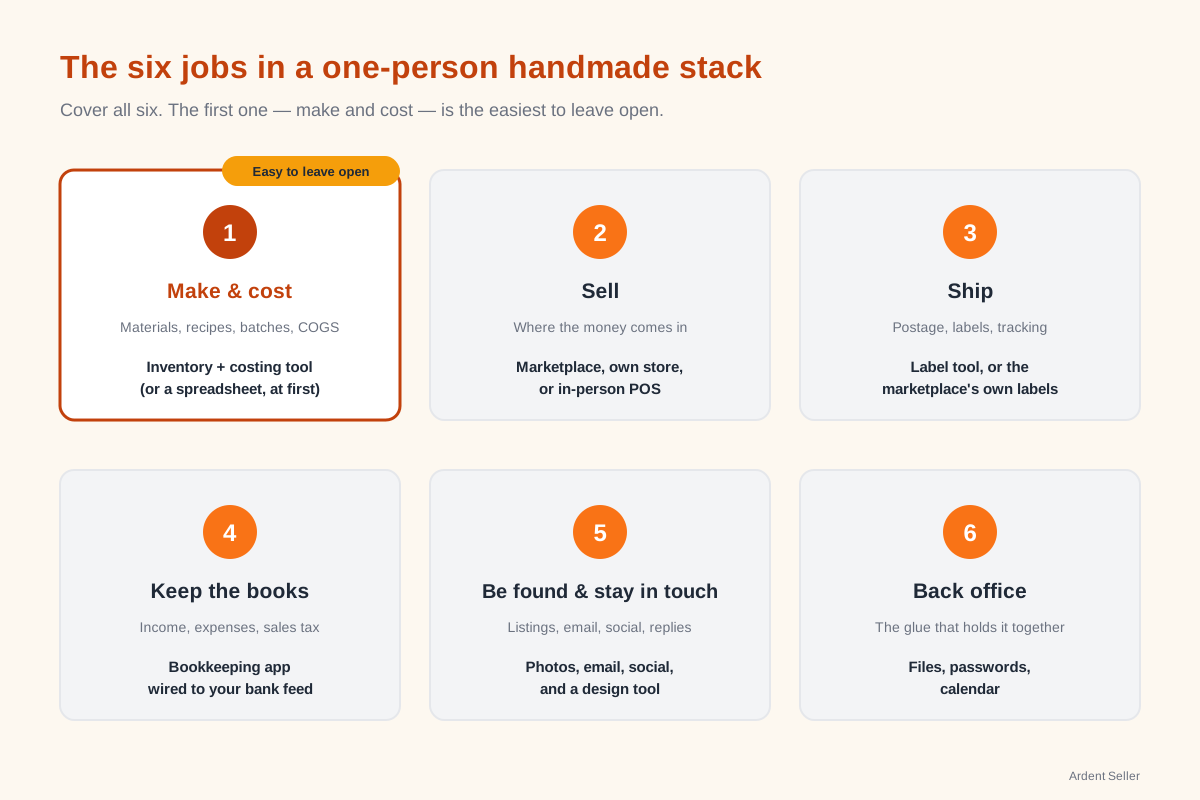
The make-and-cost job is where most stacks leak
Because it's the easiest job to get wrong, it's worth slowing down on. There are three practical ways to staff make-and-cost at the solo-maker scale, and they trade off against each other cleanly.
Option 1 — The spreadsheet
Pros: Free, infinitely flexible, completely yours, and genuinely fine when you're just starting. A tidy spreadsheet beats no system at all, every time.
Cons: Every update is manual, which means every update is a chance for a copy-paste error — exactly Priya's trap, fine right up until two evenings vanished hunting a double-counted month. It doesn't keep a live stock count, it doesn't tie a batch to its real cost, and it doesn't sync to your storefront — so the day you sell in two places, the spreadsheet is already a step behind reality.
Best for: Your first season. Under roughly 50 SKUs, a single sales channel, and a tolerance for doing the math by hand.
Option 2 — Your marketplace's built-in inventory
Pros: Free, already sitting inside the storefront you log into anyway, and it dutifully decrements a quantity every time something sells.
Cons: It counts quantities, not costs. Your marketplace doesn't know your materials, your recipe, or what a finished unit actually costs to make, so it can't tell you a margin. It also stops dead at the edge of that one channel — exactly Jordan's problem — and it has no batch or lot tracking, which matters the moment you sell food, cosmetics, or anything that could face a recall.
Best for: Single-channel sellers who only ever need to know "how many are left," not "what does this cost me" or "what's in lot #14."
Option 3 — A dedicated inventory-and-costing tool
Pros: This is a tool built for job one specifically. It tracks the whole chain — raw materials into recipes or a bill of materials, recipes into finished goods, finished goods into a real COGS figure — so a margin is something you look up, not something you guess — the number Nadia could never pull out of her supply-price spreadsheet. It keeps one master stock count, does batch and lot tracking for traceability, and reconciles counts across multiple locations. Ardent Seller is built for exactly this job, and it syncs with your Etsy shop so your online count and your master count are one number instead of two.
Cons: It's a real tool, so there's setup involved — you have to enter your recipes and starting counts once. And it's honest about its lane: a dedicated inventory tool is not your bookkeeping software and it's not your storefront. It does job one extremely well and leaves the other jobs to the tools that own them.
Best for: Anyone past the first season — selling in more than one place, working with batches, or simply tired of not knowing which product pays the rent.
What it replaces: the costing spreadsheet, the marketplace's quantity-only counter, and the four disagreeing inventory lists Jordan spent their Saturdays reconciling — folded into one count that doesn't argue with itself.
If you're genuinely torn between staying on the spreadsheet and moving to a dedicated tool, the Spreadsheet vs Inventory Software decision guide walks this exact fork with a scorecard you can run against your own shop.
The two jobs makers underbuild next
After make-and-cost, two more jobs tend to get short-changed in a solo stack.
Keeping the books. It's common to either hand a shoebox to a bookkeeper every January or bury the books inside the make-and-cost spreadsheet. Neither ages well. The cheap, durable fix is a dedicated bookkeeping tool you keep current all year instead of reconstructing in a January scramble — Wave has a free starting tier (its automatic bank-feed import is a paid add-on), QuickBooks is paid — so tax time is a report you export, not a shoebox you excavate. Crucially, your inventory tool and your bookkeeping tool are different jobs. A good inventory tool tracks the cost side beautifully and is still not your accountant; don't ask one app to do both.
Selling in more than one place. The instant you sell in two channels — Etsy plus a market, or Etsy plus Shopify plus wholesale — "how many do I have" becomes a trick question. The fix is almost never another storefront. It's a single source of truth for stock that every channel reads from, so an Etsy sale and a market sale both draw down the same number. That single-count discipline is the entire reason dedicated inventory tools exist, and it's the seam Jordan never closed.
Rule of thumb: One tool per job. The day you make your inventory app keep your books — or your one spreadsheet do all six jobs — is the day each of them quietly starts lying to you.
Your stack at a glance
You don't need every box filled with paid software. You need every box covered — and covered by a tool that tells the truth. For a lot of one-person makers, the box most likely to be sitting empty is the first one — make and cost.
| The job | What it covers | A common starting point | Upgrade when… |
|---|---|---|---|
| Make & cost | Materials, recipes, batches, finished stock, COGS | A spreadsheet | you can't name your true margin, or you sell in 2+ places |
| Sell | Storefront, marketplace, in-person POS | Etsy, or a Square reader at markets | you outgrow a single channel |
| Ship | Postage, labels, tracking | Your marketplace's built-in labels | you ship enough that postage discounts move real money |
| Keep the books | Income, expenses, sales tax, P&L | Wave (free tier) or QuickBooks | tax season takes more than one afternoon |
| Be found & stay in touch | Photos, graphics, email, social, messages | Canva plus your inbox | DMs and emails start slipping through |
| Back office | Files, passwords, calendar | A workspace suite plus a notes app | you can't remember where the important file lives |
The point of the table isn't to send you shopping. It's to let you find your own hole in about thirty seconds.
You don't need a twelve-app stack. You need six jobs covered by tools that don't lie to you — and for a lot of makers, the first job worth actually staffing is make-and-cost, because it's the one that's been silently setting prices wrong. If that's the gap in your stack, see how Ardent Seller fits your craft, compare Ardent Seller's pricing plans when you're weighing it up, or start on the free plan when you're ready.
Related reading
- When to Break Up With Your Spreadsheet — Once you've spotted the make-and-cost leak, this is the four-gate test for whether it's genuinely time to leave the spreadsheet behind.
- Multi-Location Inventory Tracking — The mechanics behind the single-count discipline that closes Jordan's "four lists that don't agree" problem across markets, shops, and your own storefront.
- Inventory Management for Craft Sellers — The foundational primer on job one: what to track and how, if you're building the make-and-cost layer from scratch.
Free resources
If you want to take any of this off the screen and into your actual shop, these free downloads pair well:
- Spreadsheet vs Inventory Software: The Decision Guide — A printable scorecard for the spreadsheet-versus-dedicated-tool decision, run against your own shop instead of guessing.
- Inventory Tracker Starter Kit — If you're staffing job one for the very first time, this is the spreadsheet to start with before you outgrow it.
- Multi-Channel Sales Reconciliation Worksheet — Built for Jordan's problem: a worksheet that gets two or three sales channels to agree on a single stock count.