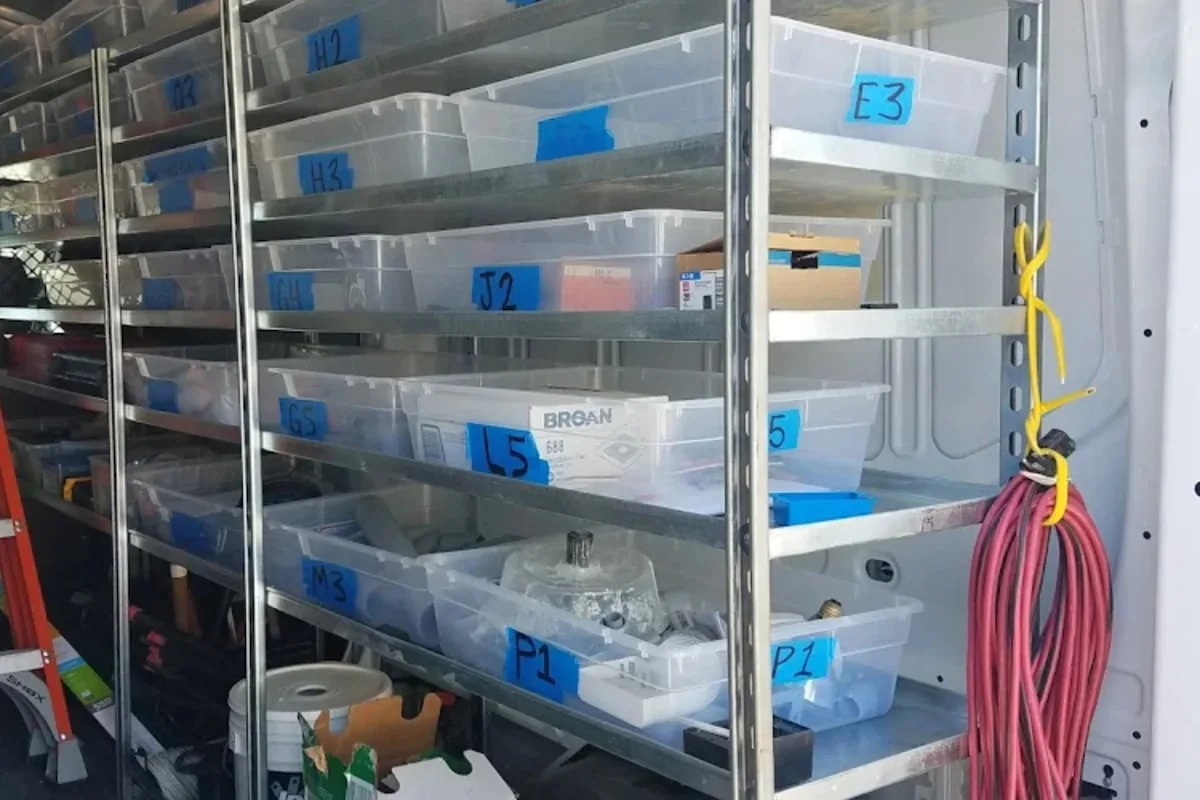
It is 9:47 p.m. on a Thursday. You are standing in front of a shelf of small brown bottles. A customer just messaged asking if you still have the one with the green label that she bought last spring. You have three bottles that match that description. Two of them are products you have stopped making. One of them is the product she wants. None of them are labeled in a way that tells you which is which, because last spring you were calling them "Green-1," "Green-Old," and "Green-green."
You are experiencing the natural end state of a SKU system designed by a person in a hurry.
Almost every small seller builds their first product-code system the same way: on a Tuesday, while listing a new batch, typing whatever came to mind into the "SKU" field because the platform insisted on one. A year later that field contains 147 entries, no two of which follow the same pattern, and the question "which variant is this again" is now answered by opening a photo, zooming in, and squinting. This is not a system. It is archaeology.
The fix is not to be cleverer. The fix is to be boring, consistent, and a little bit opinionated about structure before you make another listing. Below is how to do that — first with what a SKU actually is, then with the design rules that matter, and finally with the checklists you can tape to your wall and use next time you onboard a product.
What a SKU actually is (and what it is not)
A SKU — Stock Keeping Unit — is the unique code you assign to every distinct, sellable version of a product. If you sell a candle in three sizes and four scents, you do not have one SKU. You have twelve. Each size-and-scent pairing is something a customer can buy, count, photograph, and ship, and each one needs its own identifier.
A SKU is not a barcode. Barcodes are for scanners and come from a completely different universe — the GS1 organization assigns them (GS1 US (opens in new tab)), and you typically only need one if you sell through big-box retail. Your SKU is for you. It is the name you use internally, the thing that shows up on your packing slips, and the filter you type into your inventory system when a customer asks which variants are in stock.
A SKU is also not the product name. "Lavender Soy Candle, 8oz" is a product name. A SKU is shorter, machine-friendly, and free of spaces or punctuation that will get mangled the moment it touches a CSV file. Keep the poetry for your marketing copy. The SKU is the inventory equivalent of a license plate.
Rule of thumb: If you find yourself typing the whole product name every time you want to reference an item, you do not have a SKU. You have a description wearing a nametag.
Why a bad SKU system is more expensive than you think
Nobody wakes up wanting to think about product codes. Which is exactly the problem. The cost of a bad SKU system is invisible for about six months and then shows up all at once, usually during a stressful moment you cannot reschedule.
Here is the short list of ways a sloppy SKU scheme quietly bills you:
- Lost sales. Customer asks if you have a specific variant. You cannot find it quickly. They go somewhere else.
- Double buying. You cannot tell at a glance which raw materials you already ordered for which products, so you order them twice.
- Stocktake disasters. Counting inventory takes four times as long because half your bins are labeled with the wrong or abbreviated or expired names.
- Cost confusion. You cannot reliably roll up production costs per variant because three of your SKUs point to the same product and the other two point to nothing.
- Platform chaos. Your Etsy listings, your Shopify store, and your consignment spreadsheet all use different codes for the same item. A sale on one platform does not reduce stock on the others.
- Staff onboarding failure. The first time you try to hand off fulfillment to anyone else, they spend 20 minutes asking what "LV-8-V2-NEW" means and you realize you have been running your business inside your own head.
A good SKU system solves every one of those problems at a total cost of about two hours of up-front thinking. It is the highest-return two hours most small sellers never spend.
The anatomy of a workable SKU
Every SKU should be built from segments — small chunks of code, each of which represents one decision about the product. Think of it as an address. The country, the state, the city, and the street are all separate. You can read them left to right and get progressively more specific.
For a handmade seller, three to five segments is usually the sweet spot. Fewer and you will hit collisions (two different products with the same SKU). More and your codes stop being readable at a glance.
A typical structure for a candle maker might look like this:
CAT-PROD-SIZE-VARIANT
Which, for an 8-ounce lavender soy candle, produces:
CND-SOY-08-LAV
- CND — category (candle)
- SOY — product line (soy wax)
- 08 — size (8oz)
- LAV — variant (lavender)
That is it. Four segments. 13 characters. You can read it at 9:47 p.m. standing in front of a shelf, or type it into a filter field without needing autocomplete, or write it on a bin label without running out of space.
Some sellers add a fifth segment for version or year. That is fine for a vintage reseller who needs to distinguish every one-of-a-kind find by acquisition date. It is overkill for a candle maker who does not re-version products annually. The rule of thumb is: add a segment when you need it, not because it sounds thorough.
The five-step SKU design checklist
Before you assign a single code, walk through this checklist. Do it once, cleanly, and you will never redo it.
- List every distinguishing dimension of your products. For each product, write down the attributes that could vary: category, sub-category, size, color, scent, material, flavor, style, finish. Anything a customer could pick between. These are your candidate segments.
- Rank those dimensions from most to least stable. Category rarely changes. Size changes a little. Seasonal variants come and go. The stable stuff goes on the left side of your SKU. The volatile stuff goes on the right. This is the single most important ordering decision, and most sellers get it backwards because they start with the most exciting thing (the scent, the fabric, the print) instead of the most enduring thing.
- Pick a segment length and stick with it. If your size segment is two digits, every size segment is two digits. 8oz becomes
08, not8. Your system will collapse the first time one SKU isCND-SOY-8-LAVand another isCND-SOY-08-LAVand your spreadsheet treats them as different things. - Avoid ambiguous characters. Skip the letter O and the digit 0 together. Skip the letter I, lowercase L, and the digit 1 together. Skip spaces, slashes, ampersands, and any character that has ever been mangled by Excel — which is most of them. Stick to uppercase letters, digits, and hyphens. Your future self will send a thank-you note.
- Write the rules down in a one-page document. Every SKU segment, what it means, and the abbreviations you have chosen for the common values. Save it somewhere you will find it in a year. This is the only document between you and re-inventing your own system from scratch every time you add a new product.
That is the whole design phase. Five steps. One afternoon. A problem that does not revisit you for years.
The segment abbreviation checklist
Once you know your segments, you have to pick the actual abbreviations. This is where most systems die, because sellers get creative and inconsistent at the same time.
- Three-letter category codes. CND for candle, SOA for soap, BAR for soap bar, not BAR for bar soap and CANDLE for candle. Pick a length and keep it.
- Two-digit numeric sizes. 04 for 4oz, 08 for 8oz, 16 for 16oz. If you sell a 100-pound product later, you will need to revisit — but for small-batch sellers, two digits covers most size ranges.
- Three-letter scent or flavor codes. LAV for lavender, VAN for vanilla, EUC for eucalyptus. If two scents collide (LEM for lemon and LEM for lemongrass), you pick one abbreviation and fix the other. Decide once, then commit.
- A single-character version indicator only when needed. If you reformulate an existing product but keep the name, a
-V2at the end tells you the old jar and the new jar are not the same batch. Do not use this by default. Most products do not need a version suffix. - No customer-facing words in the SKU itself. A SKU is not your marketing. "HANDPOURED" does not belong in the code. Save it for the listing description. The SKU is for the spreadsheet, not the shopper.
Tape the list of abbreviations you have chosen somewhere visible. When your seasonal pumpkin scent launches in October, you are not going to remember whether you decided on PMP or PKN or PSP. You will be tempted to pick whichever looks best that morning. That is how systems drift. A chart on the wall is how they do not.
The numbering rule nobody warns you about
Here is the question that will trip up 80% of small sellers the first time they sell a one-of-a-kind item: what happens when every piece is different?
If you are a vintage reseller, a woodworker selling custom cutting boards, or a potter throwing wheel-thrown mugs where no two are identical, the structured SKU approach above does not cover you. Your SKU cannot be MUG-STW-12-BLU because the next wheel-thrown mug is also a 12-ounce stoneware blue mug and it is not the same product. It is a different physical object.
The answer for unique items is a serial-number segment appended to the end of the structured SKU:
MUG-STW-12-BLU-0147
That last segment — the 0147 — is a counter that increments every time you produce another mug, regardless of whether it is "the same" model. The structured part of the SKU tells the listing system what category it is. The serial number tells the inventory system which specific physical object you are talking about. Photos, provenance, weight, and any quirks attach to the serial number, not to the category code.
If you are selling batches of identical items, you do not need the serial segment. The category-plus-variant SKU is enough. If you are selling physically unique items, you need both. Mixing the two approaches is fine — most makers have a mix of predictable variants and true one-offs.
The common mistakes checklist
Before you ship your system, read this list and confirm you have not made any of them. Most small sellers trip on at least three.
- You used the product name as the SKU.
LAVENDER-CANDLE-8OZworks fine until you rename the product to "Midnight Lavender" and now your listing says one thing and your inventory says another. SKUs should be short codes, not rephrased names. - You used sequential numbers with no structure.
SKU-001,SKU-002,SKU-003. Every item has a unique code, which is technically correct, and every code is meaningless to a human, which is the actual problem. You should be able to read a SKU and know what it is. - You mixed uppercase and lowercase.
cnd-soy-08-lavandCND-SOY-08-LAVare the same product to a human and different products to a computer. Pick a case (uppercase is standard) and never mix. - You left zero room to grow. Your SKU format fits exactly the products you sell today and no more. When you add a new category next year, you have to redesign. Leave one empty segment or one unused prefix character for future use. It costs nothing to reserve and a lot to retrofit.
- You stuffed the SKU with data that belongs elsewhere. The color hex code, the supplier name, the date of manufacture — none of these belong in the SKU. They belong in the product record. The SKU is a pointer. Do not try to encode the whole product into 20 characters.
- Your SKUs are not unique. Somewhere in your system, two different products share the same code. Usually this is because you ran out of three-letter abbreviations and silently reused one. The day you discover this is the day you will ship the wrong product to a customer. Audit for duplicates before that day.
- You never wrote the rules down. There is no document, anywhere, that explains what your SKU segments mean. The system lives entirely in your head, which means the system is exactly one bad week of sleep away from total collapse.
How to migrate an existing SKU mess
Now for the seller reading this with a folder of 200 products, each of which has a SKU that looks like it was coined by a committee of raccoons. You are not starting from scratch. You are retrofitting, which is harder.
Here is the migration checklist. It is not fast, but it is finite.
- Export every product to a single spreadsheet. Columns: current SKU, product name, category, size, variant, any other defining attributes, current stock quantity, active/inactive status. Include discontinued products — they are still in your audit trail and will haunt you otherwise.
- Sort by category. Look at the whole list at once. This is the moment you see that you have 14 candles coded three different ways, four soap SKUs that do not start with SOA, and at least one product whose SKU is literally the word "NEW" followed by a random number.
- Design your target SKU system using the five-step checklist above. Do this in a blank document. Do not try to retrofit your existing codes into a new system. Design the clean version first.
- Add a second column to your spreadsheet: New SKU. Leave it blank for now.
- Fill in the new SKU column one category at a time. Not one product at a time. One category. This keeps your brain in the right mode — you are thinking about all candles together, then all soaps together, rather than jumping between product lines and losing consistency.
- Audit for duplicates in the new column before you change anything. Sort by new SKU. Look for repeats. Fix them. It is much, much cheaper to fix a collision on a spreadsheet than in a live inventory system that has orders attached to it.
- Update one platform at a time. Start with the system that is the source of truth for your inventory — usually your core inventory tool. Then update your Etsy listings, your Shopify catalog, and any consignment or wholesale partners. Keep a mapping document (old SKU → new SKU) for at least a year, because old invoices and customer messages will still reference the old codes and you will need to look them up.
- Archive the old SKUs; do not delete them. Your audit trail and your tax records refer to the old codes. Keep the mapping and the history. If an accountant asks what you sold in Q3 two years ago, the trail has to still work.
This migration will take a weekend for a seller with a few hundred products. It will feel like busywork until the first week afterward, when you suddenly realize you are answering customer inquiries twice as fast and your stocktake takes half as long.
Where a real inventory system earns its keep
Spreadsheets are where small businesses go to feel organized on the way to being disorganized. They are fine for your first 30 products. They get creaky at 100. They actively lie to you at 300.
A proper inventory platform does three things a spreadsheet cannot: it enforces SKU uniqueness automatically, it lets you attach variants to a parent product so related SKUs stay grouped, and it tracks the same SKU across multiple locations (your workshop, your market booth, your consignment shelf) without you needing to reconcile copies of a document by hand.
This is exactly the problem Ardent Seller was built to handle. You define your products once, attach variants with their own SKUs, and the system tracks quantities, costs, and history across every location you sell from. When a customer asks about the green-label bottle on a Thursday night, you type three characters into a filter and the answer is on your screen in half a second — which is what inventory software is supposed to do, and what a folder of aging spreadsheets almost never does.
The quarterly SKU audit checklist
The last checklist. Run this every three months, or any time you add more than 20 new products at once.
- Every active product has a SKU that follows your documented rules.
- No two active products share the same SKU.
- No SKU contains spaces, lowercase letters, or ambiguous characters (O/0, I/1/l).
- Every SKU segment length is consistent across the catalog.
- Discontinued products are marked inactive but their SKUs are preserved for historical lookup.
- Your SKU rules document exists, is current, and is accessible to anyone else who might touch your inventory.
- Your SKUs match across every platform you sell on (your inventory system, Etsy, Shopify, consignment partners, wholesale buyers).
If every box is checked, you are running a system. If any box is not, you are running the beginnings of next year's archaeology project. Fix it now, while the product list is still small enough to fix in an afternoon.
Close the loop before the shelf fills up
The best time to design a SKU system was before you listed your first product. The second-best time is the afternoon you are reading this. Every new product you add to an unstructured system makes the eventual cleanup harder, and every product you add to a clean system takes about ten seconds more thought than you are used to giving it — and saves a future version of you an entire evening of squinting at small brown bottles.
Whether you adopt the approach above, borrow parts of it, or build your own, the goal is the same: a system where any product can be found, named, and counted in seconds, by anyone, without asking you. That is not a grand technical achievement. It is just the quiet backbone of a business that scales without breaking.
Ready to stop running your inventory out of your head? Try Ardent Seller free and set up a SKU structure that grows with your business — variants, locations, and all.
Related reading
- Inventory Management for Craft Sellers — SKUs are the spine of a working inventory system — this is the rest of the skeleton.
- Shopify Inventory Limitations for Makers — Where a Shopify store's own inventory stops for a maker, and why the SKU is what lets a second system pick up from there.
- Laser Engraving Blank Inventory Tracking — A worked case of this SKU scheme in a shop where every size and color of blank needs its own code and its own reorder point.
- Multi-Location Inventory — Multi-location operations only work when SKUs mean the same thing in every place they appear.
- Stocktake Guide — Counting goes faster when every product has a clear, scannable identifier.
- Best Barcode Scanner for Small Business Inventory — Once every SKU is printed as a barcode, this is how to pick the scanner that reads it, and why the cheapest 2D model now undercuts most 1D ones.
Free resources
A few free downloads from the Ardent Workshop library that pair well with this post:
- SKU Naming & Barcode System Starter Kit — The PDF companion to this post. The CAT-LINE-SIZE-VARIANT prefix pattern with three worked examples, when barcodes pay for themselves, free vs. paid barcode options (Code-128, GS1, Amazon GTIN Exemption), and a one-page printable cheat sheet for the workbench wall.
- Spreadsheet vs Inventory Software: The Decision Guide — SKU drift is one of the cheapest expensive habits a fragile spreadsheet builds. This 11-page guide includes a self-assessment for whether your current sheet still scales with your catalog.
- Craft Seller Startup Checklist — Inventory cataloging, pricing, and the legal essentials — the broader foundation a clean SKU system anchors into.